Home
Help
FAQ
Changelog
Log In
Join Beta
Feature Categories
Core Rundown Management
Timing & Tracking
User Interface
Collaboration
Organization
Import/Export
Face Sheets
Display Features
Team Features
Customization
ShowCall Features
Complete feature overview for professional event production
Core Rundown Management
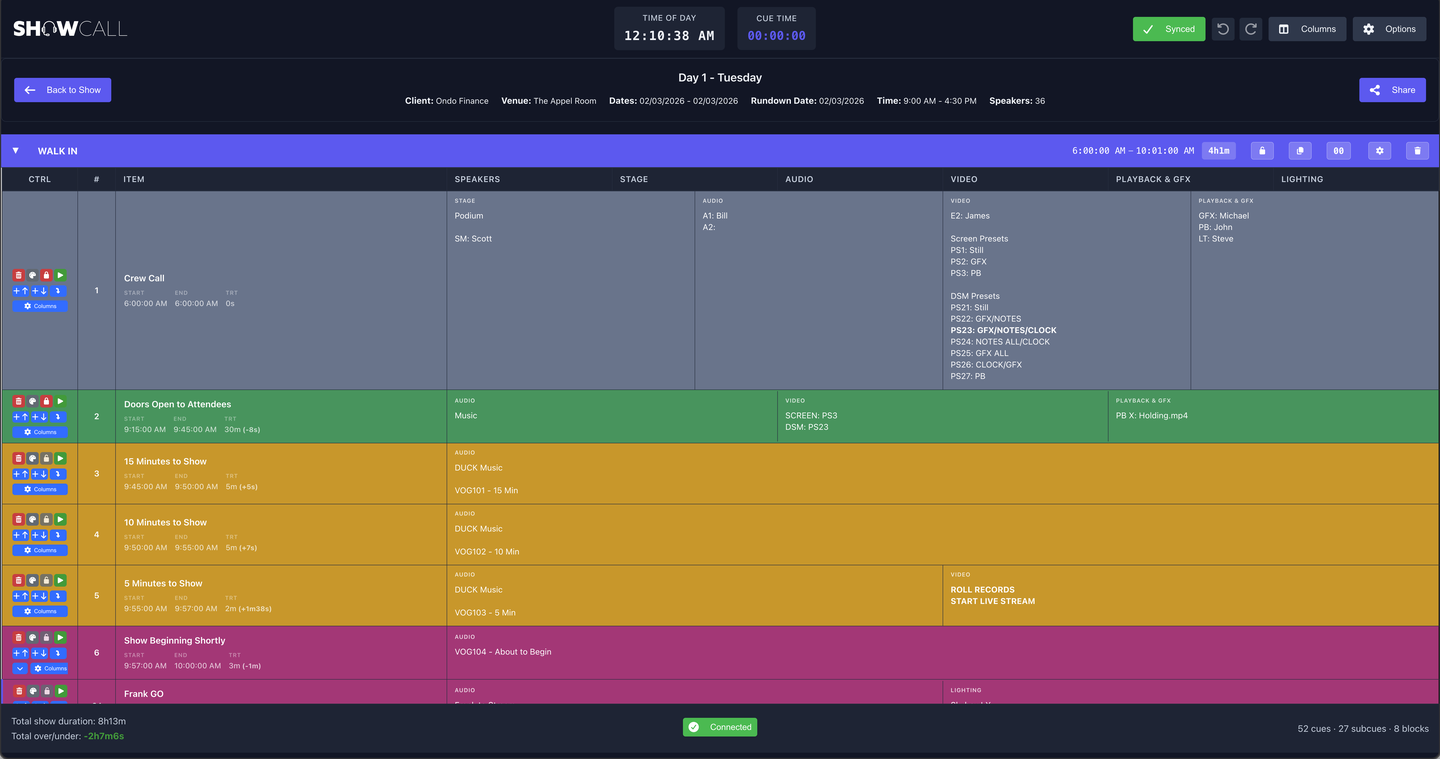
Spreadsheet-Style Editing
Excel-like Navigation:
Industry-standard interface with single-click select, double-click edit, arrow key navigation
Inline Editing:
Click any cell to edit directly with auto-save
Keyboard Shortcuts:
Shift+Arrows for navigation in edit mode, Alt+Arrows to add cues, Cmd/Ctrl+F for find & replace
60fps Performance:
Optimized DOM manipulation for instant response with hundreds of cues
Cue Management
Drag and Drop:
Reorder cues and move between blocks
Automatic Renumbering:
Sequential numbering with custom number preservation
Subcues:
Hierarchical cue structure with automatic lettering (1A, 1B, 1C)
Subcue Group Movement:
Parent cues move all subcues together
Multi-Select Operations:
Bulk delete and move multiple cues
Block System
Container Blocks:
Individual bordered containers with headers, content, and footers
Collapsible Sections:
Click headers to collapse/expand for space management
Block Templates:
Save blocks as reusable templates with all cues, colors, and timing
Template Manager:
Spreadsheet editor for templates in Settings
Customizable Headers:
Color picker for background and text colors
Block Timing:
Toggle between linked and independent timing modes
Search & Replace
Find & Replace Modal:
Cmd/Ctrl+F opens comprehensive search interface
Real-Time Search:
Updates as you type across all cue fields
Case Sensitive & Whole Word:
Advanced search options
Results Navigation:
Next/Previous with Enter/Shift+Enter shortcuts
Replace All:
Batch replacement with success messages
Timing & Tracking
Precision Timing
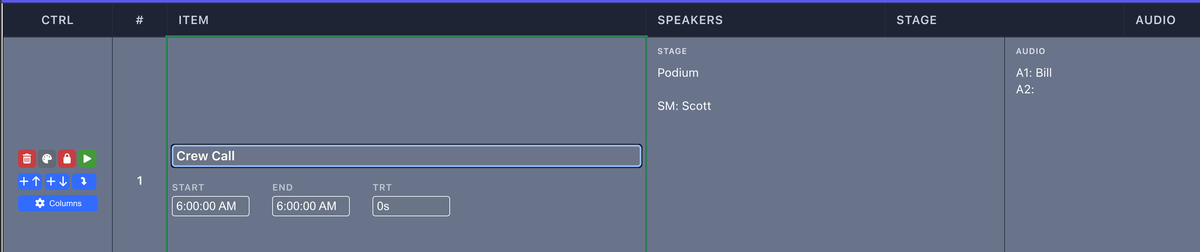
Combined Timing Column:
Item name with labeled Start/End/TRT fields
Automatic Calculations:
End time, duration, and total running time auto-calculated
Multiple Input Formats:
HH:MM:SS, MM:SS, natural language (5m30s), or plain numbers (defaults to minutes)
Time Cascade:
Changes flow through subsequent cues with smart lock detection
24-Hour Limit:
Rundowns constrained to single calendar day
Block Timelock:
Independent timing for specific blocks
Live Tracking
Real-Time Cue Tracking:
Click track button or use spacebar to advance
Auto-Scroll:
Active cue stays visible during tracking
Subcue Timer Lock:
Timer stays locked to parent cue when tracking subcues
Over/Under Time Tracking:
Shows actual vs planned timing during execution
Cue Timer Adjustment:
+1/-1 minute buttons for manual timer control
Customizable Tracking Color:
Choose highlight color for your environment
Timing Displays
Cue Timer:
Live countdown for current tracked cue
Time of Day:
Current time display in header
Fullscreen Timer:
Click timer for fullscreen display with independent theme control
Fullscreen Clock:
Click time of day for fullscreen clock with dynamic sizing
User Interface
Modern Layout
Full-Width Design:
Edge-to-edge layout optimized for screen space
Smart Column Scaling:
Automatic font scaling to fit columns in viewport
Responsive Tables:
All columns visible without horizontal scrolling
Sticky Header:
Column headers stay visible while scrolling
Smooth Scrolling:
No scroll capture interruptions from blocks
Column System
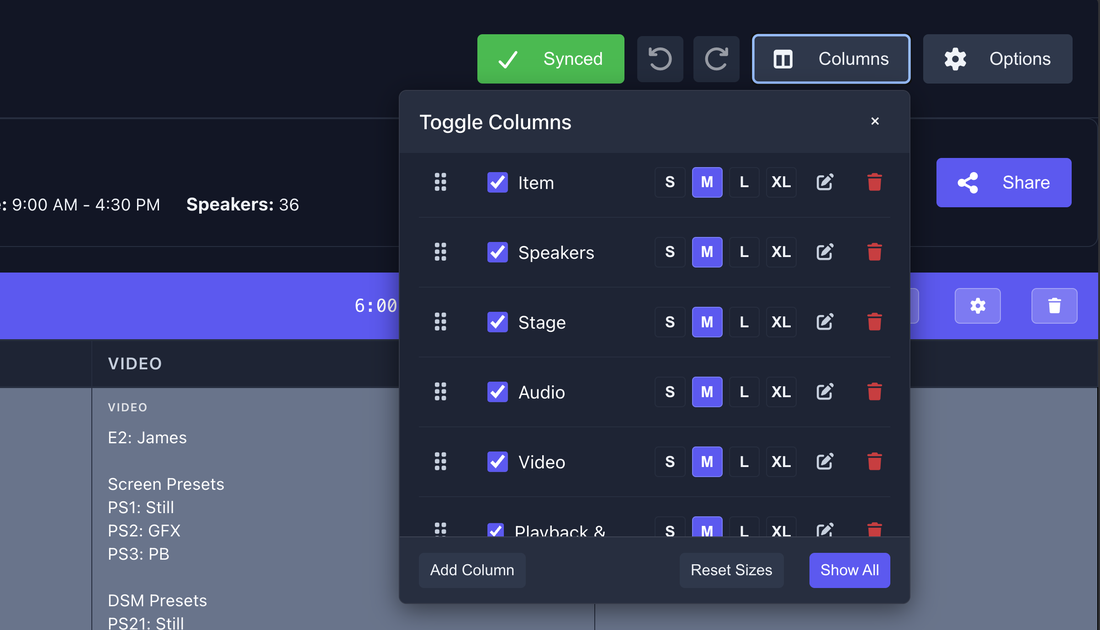
Default Columns:
Cue #, Item (timing), Speakers, Stage, Audio, Video, Playback, Lighting, Notes
Custom Columns:
Create, edit, and delete custom columns
Column Widths:
Fixed CTRL/# columns, adjustable S/M/L/XL for others
Column Visibility:
Toggle visibility with persistence
Width Persistence:
Sizes save per-rundown in Firebase
Cell Content
Text Formatting:
Bold (**text**) and italic (*text*) markdown
Image Support:
Upload images (25MB limit) with full-width display and modal viewer
Link Chips:
Automatic URL detection with page title fetching and interactive chips
Speaker Chips:
@mention speakers with inline headshots and company info
Custom Row Colors:
Color picker for row backgrounds with automatic text contrast
Themes
Five Themes:
Light, Dark, Deep Dark, Night Blue, High Contrast
Cross-Device Sync:
Theme preferences save to Firebase and sync across devices
Independent Timer Themes:
Fullscreen timer has separate theme control
Real-Time Collaboration
Live Editing
Simultaneous Editing:
Multiple users can edit same rundown
Live Indicators:
See who's editing which cells
30-Second Polling:
Automatic updates from other users
Conflict Resolution:
Protected editing prevents data loss
Firebase Sync:
Real-time database synchronization
Mentions & Notifications
User Tagging:
@@username to notify team members
Speaker Mentions:
@SpeakerName to reference speakers
In-App Notifications:
Dropdown shows all tags
Email Notifications:
Automated emails with direct links
Contextual Alerts:
See show, rundown, cue, and context
Version Control
Auto-Save Versions:
Snapshots every 5 minutes during editing
Named Versions:
Create milestones with descriptions
Version Panel:
Collapsible sidebar for quick access
Visual Diff:
Compare changes between versions
One-Click Restore:
Revert to any previous version
Undo/Redo:
Full undo/redo support for recent actions
Organization & Management
Show Organization
Status Levels:
Pre-Show, In Show, Post-Show, Archived
Drag & Drop:
Reorder within status or move between statuses
Multiple Sort Options:
Custom Order, A-Z, Z-A, Start Date, Creation Date
Card View:
Visual cards with preview and hover actions
List View:
Compact table format with direct buttons
Archive System:
Read-only archived shows with content preservation
Rundown Management
Multiple Rundowns:
Create multiple rundowns per show
Rundown Metadata:
Name, date, start/end times, description
Quick Creation:
"New Rundown" card for inline creation
Fast Loading:
Optimized metadata fetching (under 1 second)
Offline-First Design
Full Offline Support:
Create shows, rundowns, and cues without internet
Temporary IDs:
Offline-created items get temp IDs
Automatic Sync:
Changes sync when connection restored
ID Remapping:
Maintains relationships after sync
Sync Status Indicator:
Shows offline/online state
Import & Export
Excel Export
Formatted Spreadsheets:
All cue data with proper formatting
Metadata Sheet:
Show and rundown information included
Custom Column Support:
All columns export correctly
Row Color Preservation:
Custom colors maintained
Text Formatting:
Prevents ID corruption in Excel
Import System
Drag & Drop:
Upload Excel or JSON files
Preview Mode:
See cue and block counts before importing
Data Validation:
Error messages for invalid data
ID Generation:
Automatic handling to avoid conflicts
Subcue Support:
Properly imports hierarchical cues
PDF Export
Professional Documents:
Client-ready PDFs
Column Selection:
Choose which columns to include
Speaker Chips:
Headshots and names render in PDFs
Image Support:
Inline images render at original position
Combined Timing:
Properly expands timing column
Custom Columns:
All columns supported
Face Sheets Management
Speaker Management
Speaker Database:
Centralized storage for all speakers
Profile Management:
Name, company, title, bio, headshot
AI Processing:
Automatic background removal from headshots
Company-First Display:
Shows "Company | Title" format
Bulk Import:
CSV/Excel import with intelligent column detection
Bulk Headshots:
Upload multiple photos with name matching
Stage Layout Designer
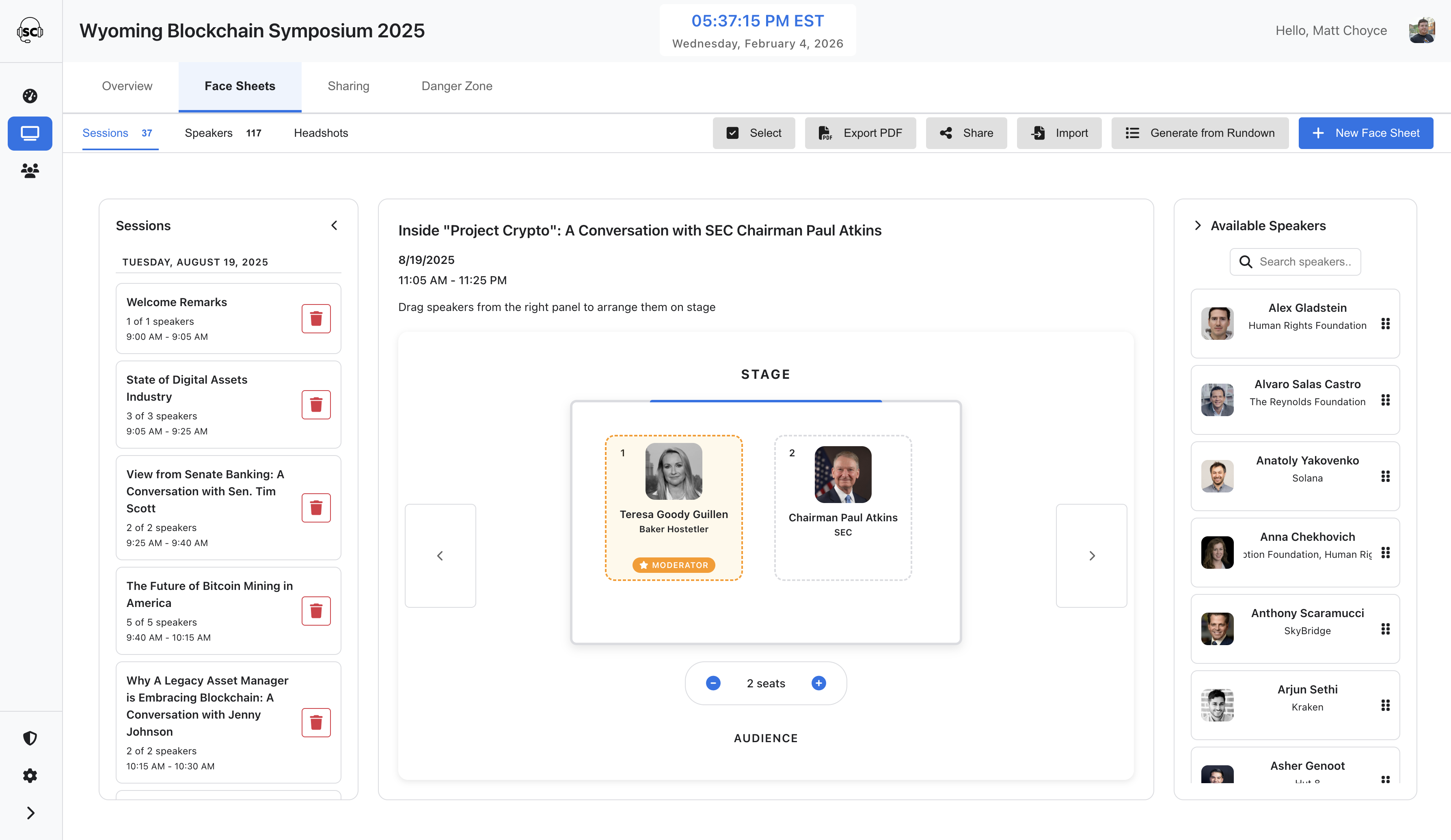
Visual Designer:
Drag-and-drop speaker positioning
Moderator Designation:
Mark panel moderators
Dynamic Seating:
Auto-adjusts for speaker count
Stage Visualization:
Real-time preview of layout
Face Sheets Features
Session Organization:
Date, time, and title for each session
Professional PDFs:
Export with stage layouts
Batch Export:
Multi-page PDFs for multiple sessions
Access Control:
Read-only for Crew Members
Display Features
Digital Signage View
3-Column Layout:
Previous (blue), Current (green), Next (yellow)
Live Countdown:
Real-time timer for current cue
Speaker Chips:
Headshots and details for @mentioned speakers
Customizable Fields:
Toggle Cue #, times, TRT, speakers, audio, video, notes
Auto-Sync:
Firebase sync for instant updates
Responsive Design:
Scales cleanly to any screen
No Authentication:
Perfect for talent monitors and crew displays
Popout Window:
1920x1080 dedicated window
Public Rundown View
Read-Only Display:
Share rundowns externally
Real-Time Tracking:
See live cue tracking
Column Controls:
Toggle column visibility
Auto-Following:
Tracks active cues automatically
Theme Support:
Dark/light theme options
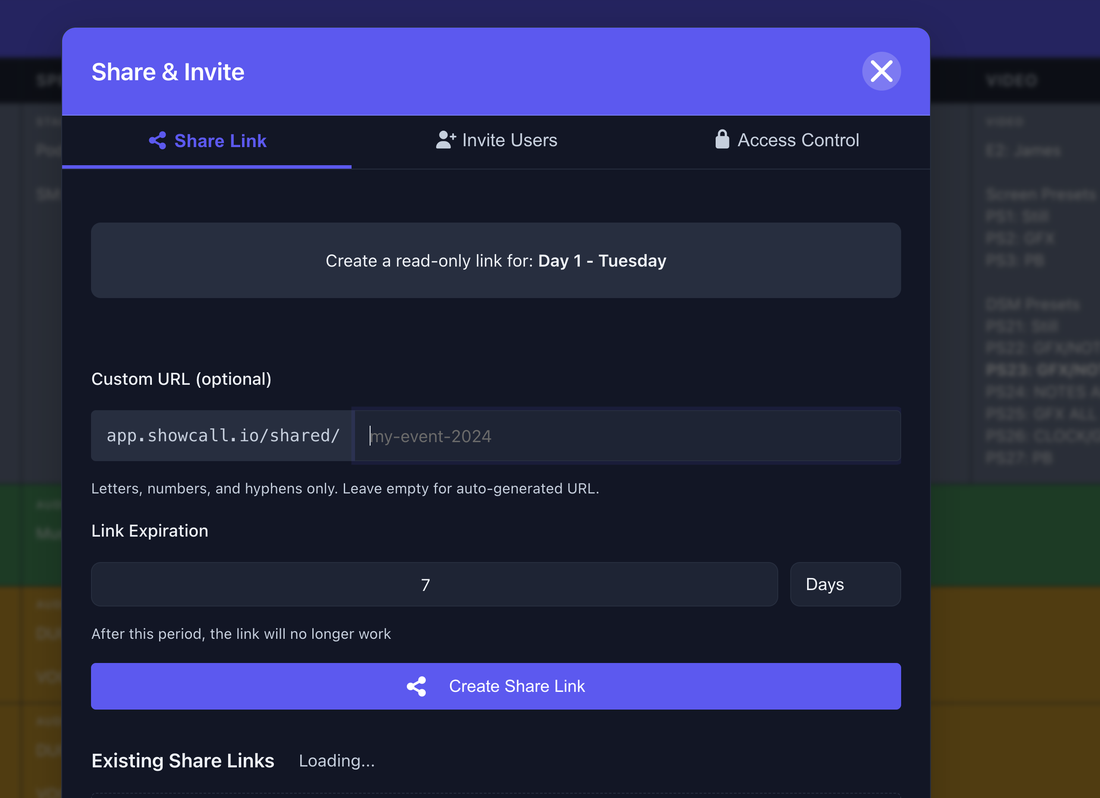
Share Links:
Time-limited links with expiration
Team Features
Team Management
Team Creation:
Producers can create and manage teams
License Allocation:
Flexible Additional Producers and Sponsored Show Callers
Role Management:
Assign Producer, Show Caller, or Crew Member roles
Unlimited Crew:
Add unlimited Crew Members
Team Dashboard:
Centralized view of all team shows
Access Control
Role-Based Permissions:
Different capabilities per role
Show Ownership Transfer:
Move shows between personal and team
Shared Shows Tab:
Dedicated tab for shared content
Access Management:
Sharing tab for streamlined control
Email Invitations:
Automated welcome emails
Crew Member Features
Personal Highlighting:
Mark specific cues with yellow highlights
Read-Only Access:
View without editing
Follow Tracking:
See live cue tracking
Face Sheets Access:
Read-only view of speaker info
Customization
User Preferences
Profile Pictures:
Upload custom profile images
Theme Preferences:
Five themes with cross-device sync
Column Preferences:
Per-rundown column widths and visibility
Sort Preferences:
Persistent sort and custom order
Rundown Customization
Custom Columns:
Create unlimited custom columns
Color Picker Columns:
Auto-detected for color fields
Column Ordering:
Arrange columns in preferred order
Block Colors:
Custom header backgrounds and text colors
Row Colors:
Custom background colors with auto-contrast
Performance
Optimized Loading:
Dashboard loads in under 2 seconds
Fast Navigation:
60fps cell navigation with direct DOM
Efficient Sync:
Minimal data transfer with parallel queries
Smart Caching:
Reduced database bandwidth
Current Version:
ShowCall v0.24.91 is in active beta development with continuous improvements.
View complete changelog →
Questions?
Visit our
Help Documentation
or
FAQ
for detailed guides and answers.